
You want a sim racing setup that feels like sitting in a real car and performs reliably across long practice and race sessions. This guide focuses on components that deliver measurable improvements to control, immersion, and lap times so you can prioritize upgrades that matter to your driving and budget.
Expect to learn which wheels, pedals, shifters, bases, and displays give you the best return on investment and why each choice will change how you drive.
Top Picks
|
Category |
Product |
Score |
|---|---|---|
|
🏆 Best Direct Drive |
96/100 |
|
|
🎯 Best Load Cell Pedals |
82/100 |
|
|
⭐ Best H-Pattern Shifter |
90/100 |
|
|
💰 Best Value Monitor |
84/100 |
|
|
🔰 Best Console Wheel |
79/100 |
|
|
🕹️ Best Xbox Wheel |
78/100 |
|
|
🔥 Best Xbox Base |
88/100 |
|
|
🏁 Best Premium Pedals |
93/100 |
|
|
🧩 Best Combo Shifter/Handbrake |
85/100 |
|
|
💸 Best Budget Handbrake |
68/100 |
How We Chose
You need hardware that improves feel, consistency, and longevity, so we prioritized force feedback fidelity, brake realism, build materials, and ecosystem compatibility. We evaluated how accurately components translate inputs into on‑track behavior, how easy they are to install and tune, and whether upgrades fit common cockpits and wheelbases.
Price and value were weighed against performance so you can decide whether to invest in pro‑level gear or sensible midrange upgrades, and we favored products with solid manufacturer support and firmware update paths.
Logitech PRO DD

You get a direct, pro‑grade steering feel with this Logitech direct drive wheel. It translates subtle track details into your hands, so practice sessions, time trials, and multiplayer races all feel more precise.
The leather rim and tactile paddles make everyday driving comfortable, while the OLED display and programmable buttons let you switch profiles and tweak settings on the fly. If you race seriously or want a step up from belt or gear wheels, this unit gives you a clear path to better lap consistency and immersion.
What People Say
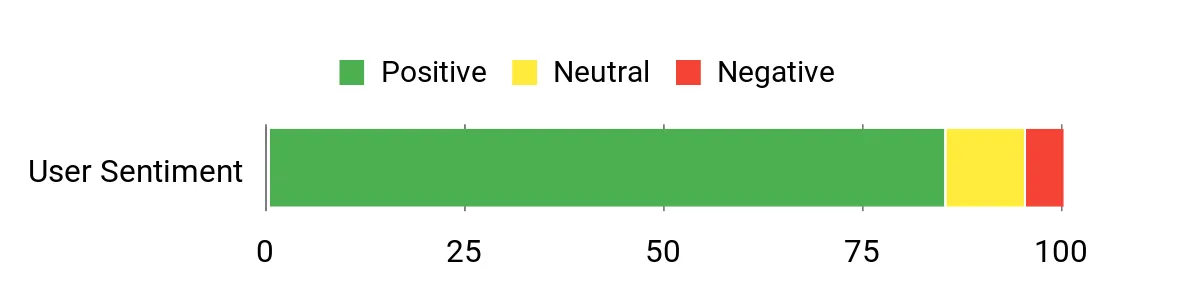
You’ll find most owners praise the wheel’s raw feedback and build quality, noting how much more track detail comes through compared with lower‑end wheels. People appreciate the leather rim and paddle feel, and many call out the OLED and button layout as genuinely useful for tuning without leaving a race.
A few users mention initial setup quirks, but overall the consensus is that the unit delivers a pro‑level driving connection.
Overall Sentiment: Positive
When It Helps
|
Situation |
How It Helps |
|---|---|
|
Daily Practice Sessions |
You can feel subtle weight transfer and curb feedback, which helps you refine braking points and corner entry consistently session after session. |
|
Competitive Time Trials |
High fidelity force feedback reveals understeer and oversteer sooner so you can extract faster, repeatable lap times. |
|
VR or Cockpit Immersion |
Direct drive torque and TRUEFORCE detail make virtual environments feel much more believable and reduce the disconnect between visuals and handling. |
|
Console Racing Nights |
Plug‑and‑play compatibility with PS5/PS4 plus onboard profiles means you can jump into races quickly while keeping pro‑level feedback. |
Ease of Use
|
Feature |
Ease Level |
|---|---|
|
Initial Installation |
Moderate |
|
Calibration and Tuning |
Moderate |
|
Onboard Controls |
Easy |
|
Firmware Updates |
Easy |
Versatility
Built to work across PS5, PS4, and PC, it adapts to different rigs and rims so you can use it for wheel‑to‑wheel racing, endurance sessions, or VR setups.
Safety
Secure quick‑release interface, robust mounting points, and contactless hall‑effect sensors reduce mechanical wear and help maintain consistent inputs over time.
Comfort
Generous leather wrap and ergonomic paddle spacing reduce hand fatigue during long stints, while the solid base keeps unwanted vibration out of your arms.
Fun Factor
Very high — the combination of strong, nuanced feedback and tactile controls makes every session feel more engaging and believable.
Key Benefits
- High‑resolution TRUEFORCE haptics for detailed force feedback
- 11 Nm direct drive motor for strong, precise torque
- Magnetic gearshift and dual clutch paddles with contactless sensors
- Onboard OLED and programmable buttons for quick profile changes
Rating: 4.7 (total: 54+)
Thrustmaster Raceline

You get a pedal set focused on brake realism and long‑term precision. The load cell brake measures pressure rather than travel, which helps you learn consistent braking inputs and improve trail braking. Hall Effect sensors reduce wear on the throttle and clutch, while the modular metal build adapts to desks and cockpits.
It’s a solid upgrade if you want a more authentic pedal feel, but make sure your wheelbase and firmware are compatible before you fit it into a console‑based rig.
What People Say
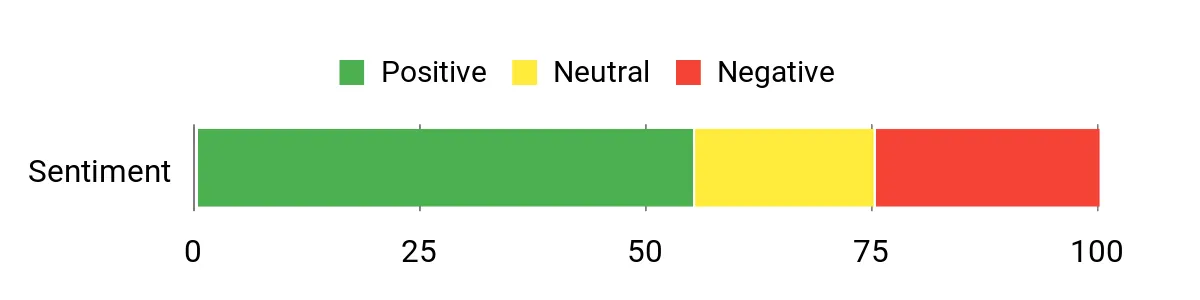
Most riders appreciate the realistic brake feel and the robust metal build, and many praise the adjustability that lets you dial in pedal travel and stiffness. Common concerns are compatibility hiccups with certain wheelbases and occasional firmware or setup headaches on consoles. When everything is configured correctly, users report a noticeable improvement in braking control.
Overall Sentiment: Neutral
When It Helps
|
Situation |
How It Helps |
|---|---|
|
Daily Practice |
Consistent brake feedback helps you ingrain correct pressure patterns and improve lap‑to‑lap repeatability. |
|
Competitive Racing |
High resolution load cell data reveals subtle braking nuances so you can push braking points without locking up. |
|
Home Cockpit Builds |
Modular metal design fits different mounting positions and scales well for cockpit or desk use. |
|
Console Setups |
Works with Thrustmaster force feedback bases on consoles, but you should verify firmware compatibility before committing. |
Ease of Use
|
Feature |
Ease Level |
|---|---|
|
Initial Installation |
Moderate |
|
Calibration |
Moderate |
|
Software Configuration |
Easy |
|
Mechanical Adjustment |
Easy |
Versatility
Adaptable to desks and full cockpits and works across PC and Thrustmaster console bases, though console compatibility can vary by firmware and base model.
Safety
Load cell rated to 220 lb / 100 kg, solid metal construction and robust mounting points that minimize unwanted flex during hard braking.
Comfort
Ergonomic pedal geometry and multiple adjustment options let you set a comfortable travel and pedal spacing for long sessions.
Fun Factor
High — the improved brake feedback makes corner entry and trail braking more satisfying and confidence‑inspiring during races.
Key Benefits
- Load cell brake for pressure‑based, realistic braking
- Durable Hall Effect sensors on throttle and clutch
- Fully modular metal construction for custom setups
- Configurable response curves and preload via software
Rating: 3.9 (total: 7+)
Thrustmaster TH8A

You get a heavy, authentic gearbox feel that elevates manual shifting in sims and truck titles alike. The TH8A swaps between classic H‑pattern and sequential modes so you can tailor the experience to the car or discipline you’re driving.
Its metal construction and contactless sensors keep shifts consistent over time, and the adjustable resistance and rotation mean you can tune the throw to match your cockpit. If you want a shifter that actually feels like a piece of hardware rather than a cheap add‑on, this is a practical and durable choice for daily practice or weekend races.
What People Say
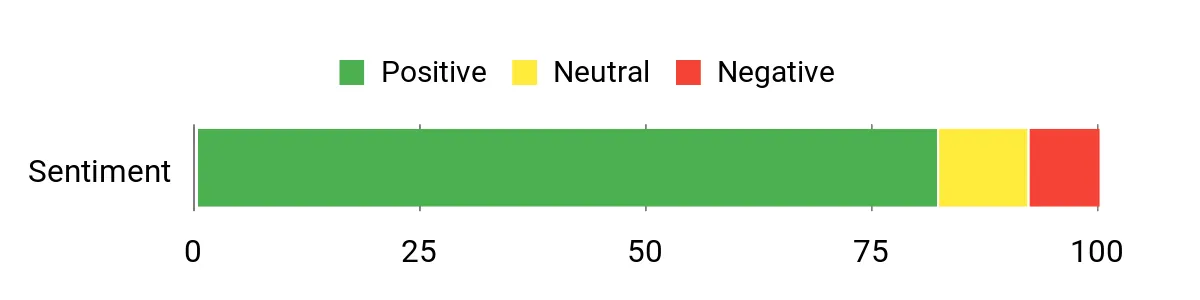
Buyers consistently highlight the TH8A’s solid, premium feel and reliable shift action, calling it a meaningful upgrade over wheel paddle shifters. Many users note simple setup and long‑term durability, while others praise the dual‑mode flexibility for switching between racing and truck sims. A small portion of feedback mentions occasional fitment or mounting preferences, but overall impressions skew very positive.
Overall Sentiment: Positive
When It Helps
|
Situation |
How It Helps |
|---|---|
|
Daily Practice |
Gives you realistic gear engagement so practice translates directly to improved shift timing and muscle memory. |
|
Racing Sessions |
Metal feel and precise sensors reduce missed shifts under pressure, keeping lap times consistent. |
|
Rally and Drift |
Sequential mode provides quick, predictable shifts when rapid gear changes matter for momentum and control. |
|
Truck Simming |
H‑pattern with multiple gears and sturdy build makes long haul driving feel authentic and satisfying. |
Ease of Use
|
Feature |
Ease Level |
|---|---|
|
Initial Setup |
Easy |
|
Mode Switching |
Easy |
|
Mounting Options |
Moderate |
|
Adjustment |
Easy |
Versatility
Works well across PC and current consoles and adapts to different rigs thanks to multiple mounting options and shift modes.
Safety
Solid metal frame and secure clamps reduce wobble; contactless sensors eliminate wear that can cause erratic inputs over time.
Comfort
Choice of short or long shift shafts and ergonomic knob options let you find a comfortable position for long stints.
Fun Factor
High — the tactile, weighted shifts deliver a satisfying mechanical feel that makes manual driving far more engaging.
Key Benefits
- Robust all‑metal construction for long life
- H.E.A.R.T. contactless sensors for consistent input
- Dual H‑pattern and sequential modes for flexibility
- Adjustable resistance and rotation to match your rig
Rating: 4.6 (total: 8233+)
LG Ultragear 27

You get a compact ultrawide-feeling display that balances sharp 1440p detail with a high 180Hz refresh rate, which helps motion stay clean and responsive during fast laps. The 27″ curved VA panel boosts contrast and color depth so track textures and brake markers are easier to read, while features like HDR10 and FreeSync smooth out tearing and brightness.
It’s a solid pick if you want a single monitor that works for daily practice, streaming HUDs, and competitive sessions where frame clarity matters.
What People Say
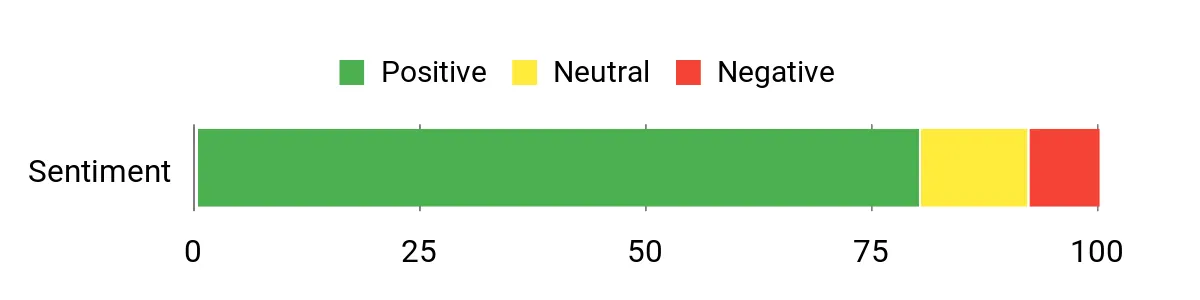
Owners commonly praise the color and picture quality straight out of the box, with many noting zero dead pixels and strong color depth compared with older panels. Users also appreciate the high refresh rate and responsiveness, though a minority report occasional HDMI/resolution quirks or setup issues that required troubleshooting. Overall impressions lean toward reliable performance and good value for a 27″ QHD gaming monitor.
Overall Sentiment: Positive
When It Helps
|
Situation |
How It Helps |
|---|---|
|
Daily Practice |
Clearer visuals and high refresh let you spot braking markers and apexes more easily, improving consistency session to session. |
|
Competitive Racing |
Fast response and adaptive sync reduce input lag and tearing so you can trust what you see during tight battles. |
|
Multitasking |
A 27″ QHD panel gives enough screen real estate for telemetry, chat, and race overlays without feeling cramped. |
|
Console Gaming |
Modern consoles and GPUs benefit from the monitor’s high refresh and HDR support, making races feel more immediate and vivid. |
Ease of Use
|
Feature |
Ease Level |
|---|---|
|
Initial Setup |
Easy |
|
On‑Screen Controls |
Moderate |
|
Inputs (HDMI/DP) |
Easy |
|
Mounting |
Easy |
Versatility
Sized for desk and cockpit setups, the monitor handles gaming, streaming overlays, and productivity tasks well thanks to QHD clarity and a fast refresh rate.
Safety
Flicker‑free panel, energy efficient mode, and reduced blue light options help reduce eye strain during long sessions.
Comfort
Tilt adjustment and a borderless bezel keep your sightlines comfortable and reduce distractions during extended practice or races.
Fun Factor
High — crisp visuals, strong contrast, and smooth frame pacing make races feel more immersive and satisfying.
Key Benefits
- Sharp QHD resolution for clearer track detail
- 180Hz refresh and 1ms response for smooth motion
- VA panel with strong contrast and color depth
- Multiple inputs and borderless design for neat setups
Rating: 4.3 (total: 1113+)
Logitech G29

You get a dependable, plug‑and‑play wheel that brings clear force feedback and a familiar, car‑like control layout to both consoles and PC. The dual‑motor system communicates road feel and traction changes without being overwhelming, while the hand‑stitched leather rim and stainless paddles improve long sessions.
It’s a practical choice for daily practice, casual league racing, or as a reliable first upgrade from controllers, and it pairs well with standalone shifters and pedal upgrades if you decide to step up later.
What People Say
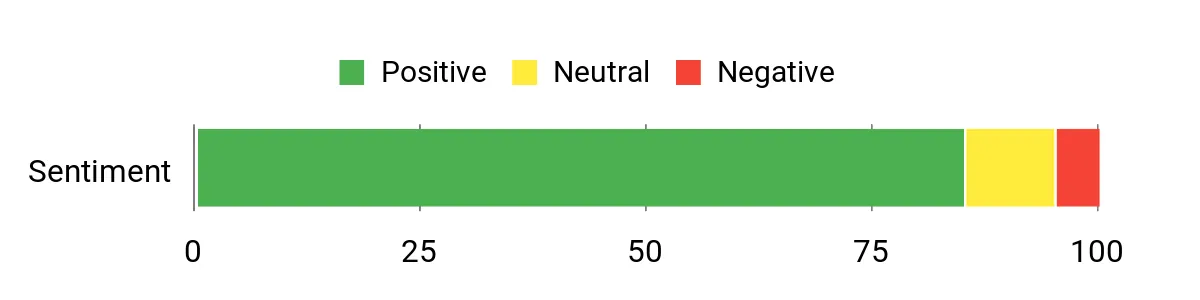
Most users praise the G29 for its solid build and convincing force feedback that improves immersion compared with a controller. People frequently mention the comfortable leather rim and usable pedal feel, and many find setup straightforward with compatible titles. A minority point out the pedal unit and clamps feel basic compared with higher‑end gear, but overall impressions are favorable.
Overall Sentiment: Positive
When It Helps
|
Situation |
How It Helps |
|---|---|
|
Beginner Setup |
Provides a realistic, accessible step up from a gamepad so you can learn weight transfer and steering inputs without a steep learning curve. |
|
Daily Practice |
Consistent force feedback and clear wheel cues let you refine braking and turn‑in repeatedly, improving lap consistency. |
|
Console Racing Nights |
Native PlayStation compatibility and on‑wheel controls let you jump into races quickly and stay focused on the track. |
|
Upgrade Path |
Works well as a foundation—add a better pedal set or a standalone shifter later without replacing your wheel base. |
Ease of Use
|
Feature |
Ease Level |
|---|---|
|
Initial Setup |
Easy |
|
Software Configuration |
Moderate |
|
Mounting |
Moderate |
|
In‑race Controls |
Easy |
Versatility
Solid cross‑platform support for PlayStation and PC with compatibility for add‑on shifters and pedal upgrades, making it useful for many sim disciplines.
Safety
Built‑in clamps and bolt points secure the wheel to desks or rigs, while durable materials and quality bearings reduce unexpected play during force feedback moments.
Comfort
Hand‑stitched leather rim and ergonomic paddle placement reduce hand fatigue during long sessions and keep controls intuitive under pressure.
Fun Factor
High — responsive feedback and tactile controls make races feel more engaging and significantly more fun than a controller.
Key Benefits
- Realistic dual‑motor force feedback for better on‑track feel
- Stainless steel paddle shifters and leather rim for comfort and durability
- Separate pedal unit with nonlinear brake for improved control
- Broad game and platform compatibility with easy setup
Rating: 4.6 (total: 21392+)
Logitech G920
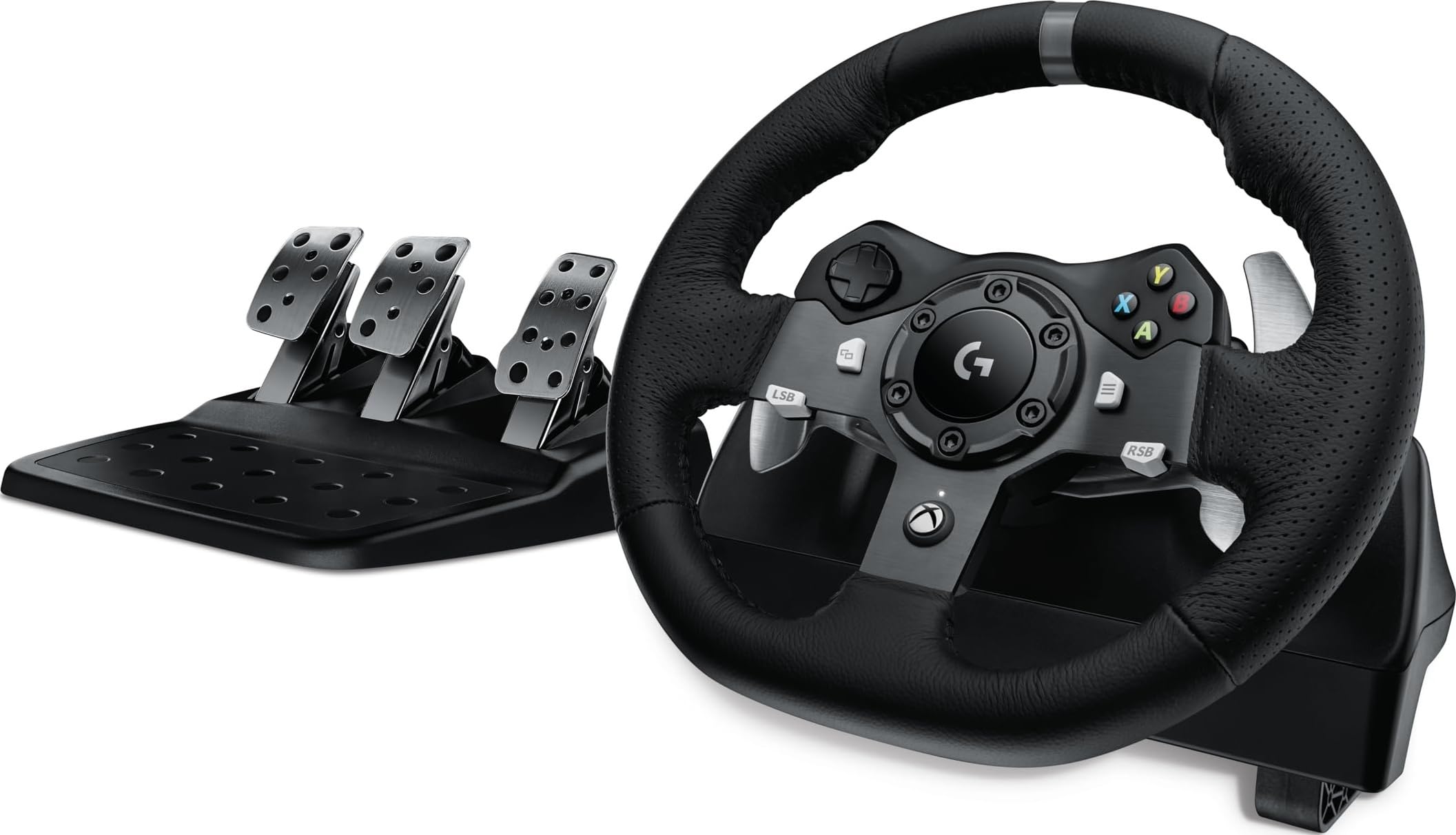
You get a reliable, console‑friendly racing wheel that translates road and tire feedback into clear wheel cues so you can drive more precisely. The dual‑motor feedback is punchy without being unruly, and the hand‑stitched leather rim plus stainless paddles keep long sessions comfortable.
Pedals are serviceable out of the box and the kit works well as a foundation if you want to upgrade pedals or add a shifter later. It’s a practical pick whether you’re stepping up from a controller, practicing daily, or running casual league races.
What People Say
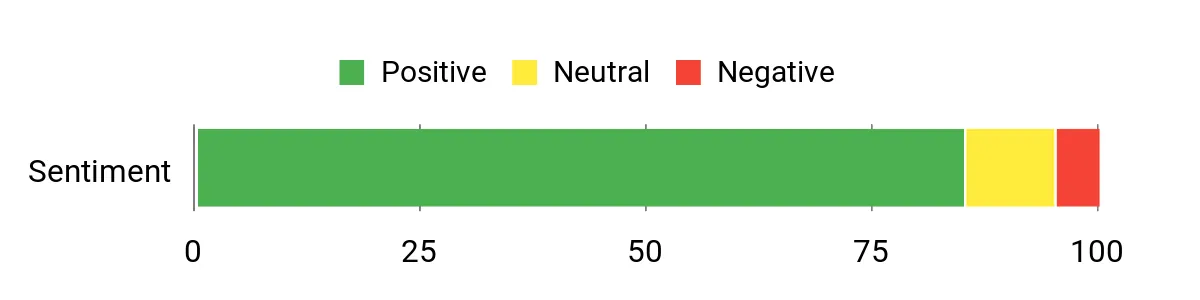
Most users highlight how much more immersive racing feels compared with a controller, pointing to the strong feedback, comfortable leather rim, and straightforward setup. People often mention the pedals and paddles as solid for the price, while a small number report pedal calibration quirks or occasional mechanical noise.
Overall the community treats it as a dependable workhorse that’s easy to live with and upgrade from.
Overall Sentiment: Positive
When It Helps
|
Situation |
How It Helps |
|---|---|
|
New Racers |
Makes the transition from gamepad feel natural, helping you learn throttle and steering inputs with clear tactile cues. |
|
Daily Practice |
Consistent force feedback and reliable inputs let you refine braking points and cornering lap after lap. |
|
Casual Multiplayer |
On‑wheel controls and LEDs keep you focused during quick matches and weekend league races. |
|
Upgrade Path |
Acts as a stable base so you can later add better pedals or a manual shifter without replacing the whole setup. |
Ease of Use
|
Feature |
Ease Level |
|---|---|
|
Initial Setup |
Easy |
|
Mounting |
Moderate |
|
Calibration |
Moderate |
|
In‑race Controls |
Easy |
Versatility
Designed for Xbox and PC, it supports a broad range of racing titles and pairs well with aftermarket pedals and shifters for different disciplines.
Safety
Built‑in clamps and bolt points secure the wheel to desks or rigs, and quality bearings reduce unwanted play during force feedback events.
Comfort
Hand‑stitched leather rim and ergonomic paddle placement reduce fatigue during longer sessions and keep controls intuitive under pressure.
Fun Factor
High — responsive feedback and tactile controls significantly increase immersion compared with a pad and make racing more engaging.
Key Benefits
- Clear dual‑motor force feedback that communicates grip and track detail
- Durable leather rim and stainless steel paddles for comfort and precision
- Separate pedal unit with nonlinear brake for better control
- Wide compatibility and easy setup across Xbox and PC titles
Rating: 4.6 (total: 22282+)
Thrustmaster TS XW

You get a powerful, tournament‑ready wheel base that brings detailed force feedback and long sessions without thermal throttling thanks to the built‑in MCE cooling. It’s designed as the heart of a Thrustmaster cockpit, working with detachable rims and offering the torque and fidelity needed to feel small track changes. For daily practice, league nights, or VR sessions it gives you clearer steering cues and a stable platform to build on, whether you pair it with higher‑end rims or stick to Thrustmaster add‑ons.
What People Say
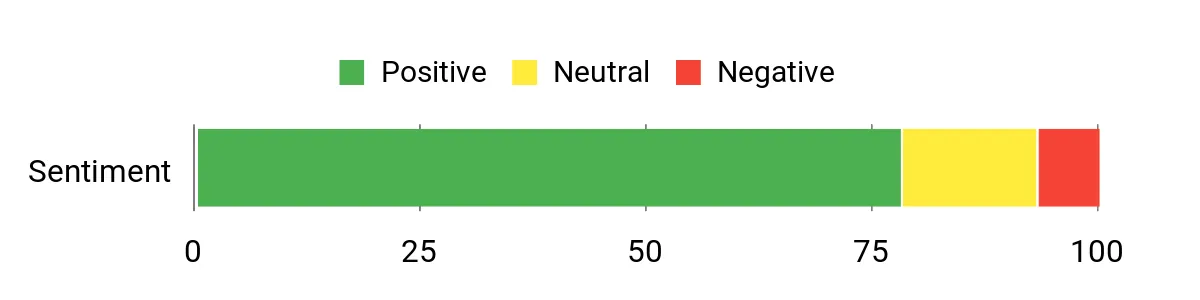
Owners frequently point to the TS XW’s strong, detailed feedback and solid construction as major wins, especially when upgrading from lower‑end bases. Many appreciate the cooling system because it keeps performance consistent during long events, and users in the Thrustmaster ecosystem note seamless compatibility with add‑on wheels.
A minority mention that it’s a heavier unit and requires a stable rig and proper mounting.
Overall Sentiment: Positive
When It Helps
|
Situation |
How It Helps |
|---|---|
|
Long Practice Sessions |
Cooling keeps motor temperatures stable so force feedback remains consistent lap after lap. |
|
Competitive Racing |
High fidelity feedback reveals subtle traction and curb information, helping you make tighter corrections under pressure. |
|
Upgrading a Rig |
Acts as a reliable central base that supports detachable rims and future upgrades without needing a new ecosystem. |
|
Console‑Based Play |
Native Xbox compatibility brings servo‑level feedback to console titles where supported, improving immersion over belt or gear bases. |
Ease of Use
|
Feature |
Ease Level |
|---|---|
|
Initial Installation |
Moderate |
|
Mounting |
Moderate |
|
Firmware Updates |
Easy |
|
Tuning (FFB Settings) |
Moderate |
Versatility
Designed to work across Xbox and PC with multiple detachable rims, it adapts to different driving styles and cockpit layouts and scales well for both arcade and sim disciplines.
Safety
Motor cooling system reduces overheating risk during extended use and robust mounting points minimize unwanted movement under strong force feedback.
Comfort
Stable, low‑vibration operation and predictable feedback reduce fatigue and let you focus on driving inputs for longer sessions.
Fun Factor
High — weighty, expressive force feedback makes turns, curbs, and surface changes feel more alive and rewarding to drive.
Key Benefits
- High‑resolution feedback from a 40W brushless servomotor
- Motor cooling (MCE) for sustained performance during long runs
- Wide compatibility with Thrustmaster detachable wheels
- Robust build quality and responsive, detailed force effects
Rating: 4.3 (total: 200+)
Logitech PRO Pedals

You get a pedal set built around a true load cell brake that measures pressure rather than travel, which immediately changes how you approach braking and trail braking. Swappable springs and well‑thought adjustment points make it easy to tune feel for everyday practice, endurance stints, or short sprint races. The USB interface and broad platform support mean it slots into PC and console rigs smoothly, and if you want a single upgrade that improves consistency and lap times, these pedals are a practical choice.
What People Say
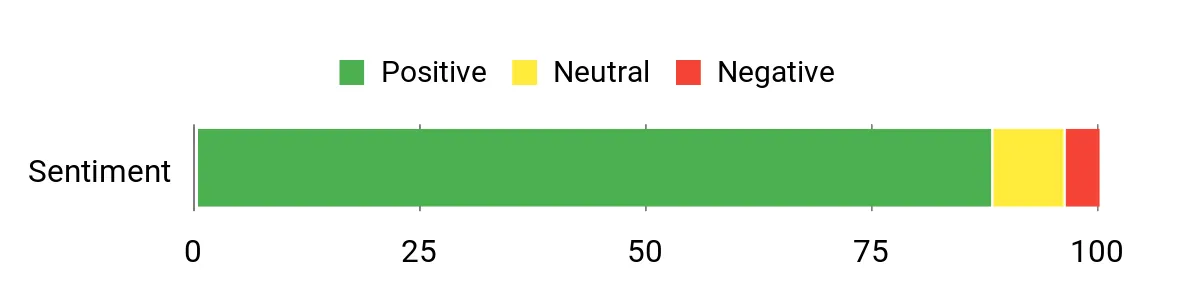
Owners frequently praise the build quality and the dramatic improvement the load cell brake brings to consistency and control. Many highlight how simple it is to change springs and fine‑tune pedal travel, and several users report immediate gains in reliability for trail braking. A small number note that setup and calibration with software require attention, but most find the process worthwhile.
Overall Sentiment: Positive
When It Helps
|
Situation |
How It Helps |
|---|---|
|
Daily Practice |
Consistent pressure feedback trains you to hit braking points repeatably, speeding up the learning curve session by session. |
|
Competitive Racing |
High resolution braking data reduces lockups and helps you modulate entry speed more precisely under pressure. |
|
Endurance Sessions |
Robust construction and stable feel keep performance steady over long stints without drift or fatigue. |
|
Pedal Upgrade Path |
Swappable springs and modular design let you adapt the pedals as you upgrade wheels or change driving style. |
Ease of Use
|
Feature |
Ease Level |
|---|---|
|
Initial Installation |
Moderate |
|
Spring Swaps |
Easy |
|
Software Calibration |
Moderate |
|
Mounting |
Easy |
Versatility
Works well on PC and current consoles, fits desk and cockpit setups, and adapts to different driving styles thanks to adjustable preload and spring options.
Safety
Load cell rated for 100 kg and a sturdy platform minimize unwanted flex and ensure consistent readings during hard braking.
Comfort
Thoughtful pedal spacing and ergonomic angles reduce leg strain, while adjustable travel and force let you dial comfort for long practice sessions.
Fun Factor
High — precise, predictable braking makes pushing later and refining technique more rewarding and engaging.
Key Benefits
- Accurate 100 kg load cell brake for pressure‑based inputs
- Easy spring swaps and mechanical adjustments for personal feel
- Durable construction with ergonomic pedal geometry
- USB connectivity and wide platform compatibility
Rating: 4.7 (total: 200+)
VelocityOne Multi‑Shift

You get a flexible shifter that covers H‑pattern, sequential, and handbrake use in one compact unit. Swap between short and long shafts or change knobs to suit road cars, rally rigs, or truck sims, and use the high/low range to extend gear mapping where games support it. The steel shafts and leather boot give a premium feel while the contactless sensors aim to reduce wear. It’s a good option if you want one device to handle multiple driving styles and avoid juggling separate peripherals.
What People Say
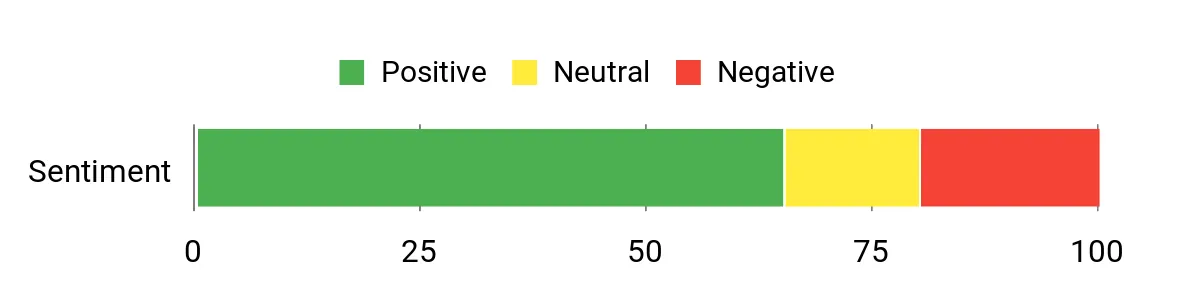
Many users like the build materials and the fact you can change between H‑pattern and sequential without swapping hardware. Owners also praise the handbrake function and included shaft options as thoughtful touches.
Recurring concerns focus on firmware revisions and occasional connectivity or reliability issues, so some buyers recommend checking firmware compatibility and testing early.
Overall Sentiment: Neutral
When It Helps
|
Situation |
How It Helps |
|---|---|
|
Road Racing |
Use the H‑gate with longer throw to simulate real car shifts and practice realistic gear selection. |
|
Rally/Drifting |
Switch to sequential for fast up/down shifts and flip on handbrake mode for controlled slides. |
|
Truck/Farm Sims |
High/Low range mapping expands gear positions so you can mimic multi‑range transmissions. |
|
Compact Rigs |
Small footprint and solid clamp options let you mount it to desks or cockpit frames without extra hardware. |
Ease of Use
|
Feature |
Ease Level |
|---|---|
|
Mode Switching |
Easy |
|
Mounting |
Moderate |
|
Calibration |
Moderate |
|
Firmware Updates |
Moderate |
Versatility
Handles multiple disciplines and setups thanks to H‑pattern, sequential, handbrake modes, short/long shafts, and wide compatibility with PC and Xbox hardware.
Safety
Contactless hall‑effect sensors reduce mechanical wear and a sturdy clamp system secures the unit under aggressive inputs.
Comfort
Ergonomic knob options and a leather shift boot make shifts feel more natural, and the included shaft choices help you find a comfortable throw.
Fun Factor
High — switching modes mid‑session and using the handbrake adds a layer of engagement that suits varied sim disciplines.
Key Benefits
- Switchable H‑gate and sequential modes for versatile use
- Contactless hall‑effect sensors for durable inputs
- Includes short and long shafts plus multiple knobs for preference
- Can function as a true analog handbrake with a mode toggle
Rating: 4.1 (total: 363+)
GSTP Shifter

You get a compact entry‑level shifter and handbrake that covers the basics well. It connects as a standard USB controller on PC and gives you both H‑gate and sequential functionality, plus a clamp that fits desks or light cockpits.
The unit leans mechanical in feel, which some drivers like for feedback and authenticity, and it’s a straightforward way to add manual shifting and a handbrake to a budget rig. If you want something to learn on or to use as a backup device, it’s a practical, space‑saving option.
What People Say
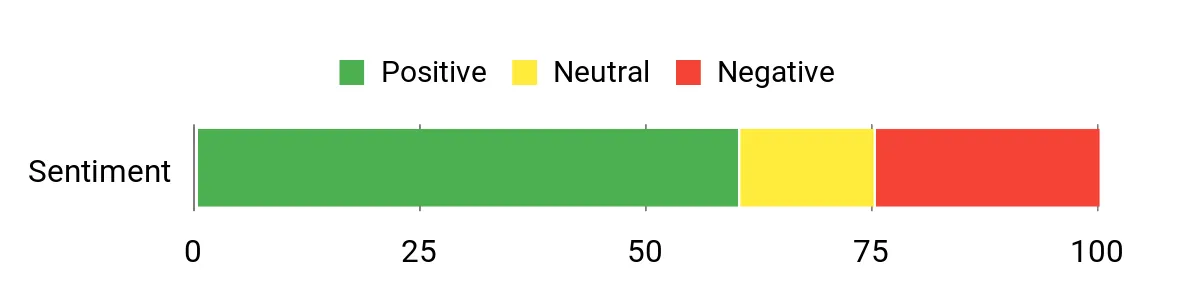
Users frequently note that the unit is surprisingly functional for its price, with quick USB recognition and a satisfying mechanical shift feel. Common praise focuses on the compact design and included handbrake, while recurring issues center on occasional stiff gears, some noise, and isolated reports of input delay or calibration quirks. Many buyers treat it as a solid starter rig or a temporary solution while upgrading.
Overall Sentiment: Neutral
When It Helps
|
Situation |
How It Helps |
|---|---|
|
Beginner Builds |
Gives you manual shifting and a handbrake without needing a full cockpit, letting you learn clutch and shift timing on a desk setup. |
|
Space‑Constrained Rigs |
Compact footprint and clamp mounting make it easy to add to small desks or combined sim/office spaces. |
|
Rally and Drift Practice |
Sequential mode and handbrake functionality let you practice quick shifts and controlled slides without separate peripherals. |
|
Backup or Secondary Unit |
Acts as a reliable spare when your main shifter is unavailable or when you need a portable option for events. |
Ease of Use
|
Feature |
Ease Level |
|---|---|
|
Initial Connection |
Easy |
|
Mounting |
Moderate |
|
Mode Switching |
Easy |
|
Calibration |
Moderate |
Versatility
Handles multiple sim types on PC and supports both H‑pattern and sequential shifting plus handbrake mode, making it flexible for different driving styles.
Safety
Solid clamp and metal components reduce unwanted movement; simple mechanical design makes troubleshooting straightforward if inputs behave oddly.
Comfort
Compact design keeps controls close for desk setups; metal shifter feels substantial but may need minor tuning to soften the throw for longer sessions.
Fun Factor
Good — switching modes and using the handbrake adds variety to sessions and increases engagement compared with a gamepad.
Key Benefits
- Plug‑and‑play USB recognition on Windows for fast setup
- Combined shifter and handbrake saves space and mounts easily
- Supports sequential and H‑pattern shifting for multiple driving styles
- Sturdy clamp and metal components for a budget build
Rating: 3.9 (total: 35+)
Logitech Driving Force

You get a compact, durable H‑pattern shifter that feels closer to a real manual gearbox than many cheap add‑ons. Its solid steel build and leather trim give a satisfying mechanical feel, and the built‑in clamps make mounting to a desk or rig straightforward.
It’s ideal if you want to move away from paddle shifting and practice true manual timing, but it also plays nicely with your existing Logitech wheel if you later add pedals or upgrade other components. For everyday practice, club nights, or casual sim laps, it’s a practical upgrade that’s easy to live with.
What People Say
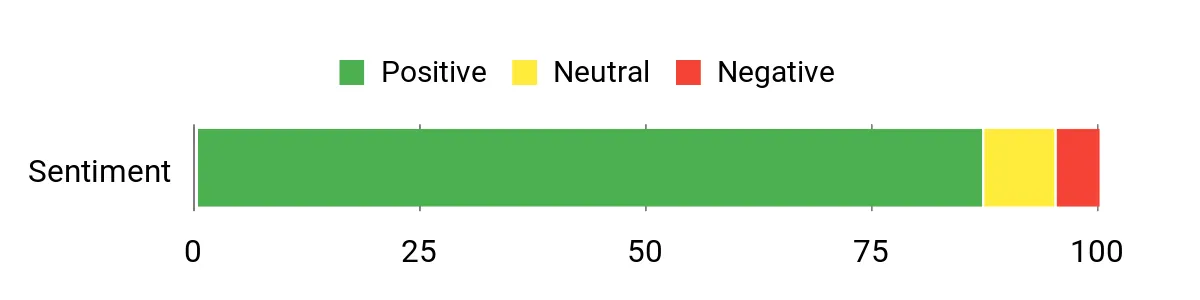
Buyers regularly point to the shifter’s tactile, satisfying shift action and durable construction as major strengths. Many appreciate how well it pairs with Logitech wheels and how quickly it gets you into manual shifting, while others note it’s a straightforward, reliable choice for adding realism. A small portion of feedback mentions that higher‑end options exist, but most users value the Driving Force as a solid, no‑nonsense upgrade.
Overall Sentiment: Positive
When It Helps
|
Situation |
How It Helps |
|---|---|
|
Learning Manual Shifts |
Gives you a genuine H‑pattern layout so you can practice clutch and shift timing that transfers to real‑world technique in sims. |
|
Club Nights |
Robust construction and quick mounting let you join multi‑player or local events without wrestling with setup. |
|
Casual Racing |
Short throw and clear gate feedback make gear changes intuitive during quick race sessions. |
|
Upgrade Path |
Works with existing Logitech wheels so you can add pedals or a higher‑end base later without replacing the shifter. |
Ease of Use
|
Feature |
Ease Level |
|---|---|
|
Initial Setup |
Easy |
|
Mounting |
Easy |
|
In‑game Mapping |
Moderate |
|
Maintenance |
Easy |
Versatility
Primarily a six‑speed H‑pattern for racing sims, but compatible across PC and modern consoles and pairs well with other Logitech accessories.
Safety
Secure clamps and solid metal construction reduce unwanted movement and provide consistent inputs under aggressive shifts.
Comfort
Short throw and ergonomic knob placement keep shifts comfortable during long sessions, and the leather finish reduces hand fatigue.
Fun Factor
High — tactile, mechanical shifting adds a satisfying layer of realism that makes manual driving more engaging.
Key Benefits
- Authentic six‑speed H‑pattern feel with solid mechanical engagement
- Robust steel and leather construction for long‑term use
- Secure clamps for easy mounting to desks and cockpits
- Plug‑and‑play compatibility with Logitech wheel ecosystems and major consoles
Rating: 4.6 (total: 37709+)
Kado Triple 27

You get a ready‑made triple monitor setup that’s designed for multitasking and immersive cockpit views. The 27″ FHD panels offer a wide combined workspace for telemetry, chat, and race overlays, and the curved 1500R design makes the trio feel more cohesive than three flat screens.
Built‑in speakers and included HDMI cables simplify setup for a home office or compact sim rig, and the set is especially handy if you want more screen real estate without hunting down matched monitors individually. For productivity and casual sim use it’s an efficient, space‑saving option.
What People Say
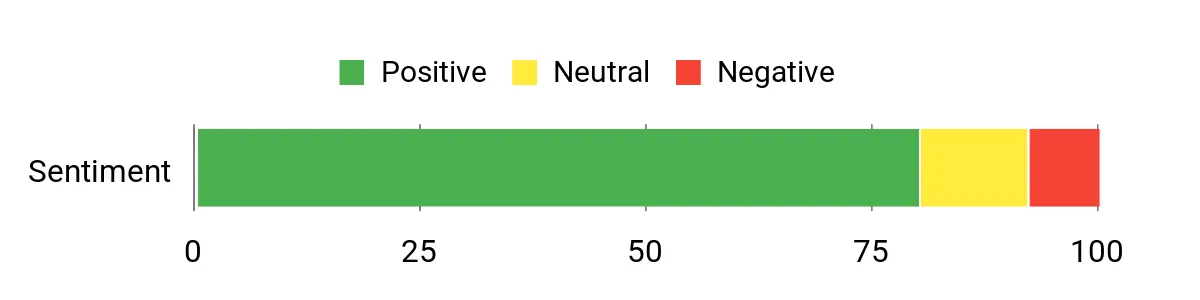
Buyers frequently praise the convenience of a matched three‑pack and the clear, vibrant picture for office and gaming tasks. Setup is noted as straightforward thanks to included cables, and reviewers often highlight the value for multitasking.
A minority mention the built‑in speakers lack volume, but most users find the visuals and bundled accessories deliver reliable performance for everyday use.
Overall Sentiment: Positive
When It Helps
|
Situation |
How It Helps |
|---|---|
|
Cockpit Multiview |
Three matched screens give you wraparound sightlines for telemetry, mirrors, and track awareness without complex matching. |
|
Productivity |
A wide combined desktop makes spreadsheets, timing windows, and streaming overlays easy to arrange without juggling windows. |
|
Compact Office |
Wall‑mountable panels and included cables simplify installation in small spaces where a single ultra‑wide isn’t practical. |
|
Casual Gaming |
Adaptive Sync and decent color depth keep motion smooth for less demanding racing titles and multitasking between apps. |
Ease of Use
|
Feature |
Ease Level |
|---|---|
|
Out‑of‑Box Setup |
Easy |
|
Mounting |
Moderate |
|
Inputs (HDMI) |
Easy |
|
Color Calibration |
Moderate |
Versatility
Suitable for mixed use: cockpit multi‑view, office productivity, and casual gaming. Works well where matched panels and compact mounting are priorities.
Safety
Flicker‑free panels and a blue‑light filter option help reduce eye strain during long sessions.
Comfort
Curved panels reduce eye travel across the trio and the matte finish limits reflections, which helps during extended work or practice stints.
Fun Factor
Moderate — not a high‑end gaming display setup, but the immersive triple layout adds engagement for sim layouts and multitasking.
Key Benefits
- Triple‑monitor package removes matching hassles
- Curved 1500R panels create a cohesive visual field
- FHD clarity with adaptive sync for smoother motion
- Includes HDMI cables and basic speakers for quick setup
Rating: 4.5 (total: 74+)
Samsung Odyssey G9

You get an ultra‑wide, wraparound display that makes tracks and telemetry feel immediate. The 1000R curve and Dual QHD resolution put more of the race in your field of view, while 240Hz and a 1ms response time keep motion crisp during high‑speed sections. It’s well suited for single‑monitor cockpit setups, multitasking across apps, or replacing multi‑monitor arrays for a cleaner desk. If you have the desk depth and want maximum immersion, this monitor delivers one of the most cinematic sim racing experiences available.
What People Say
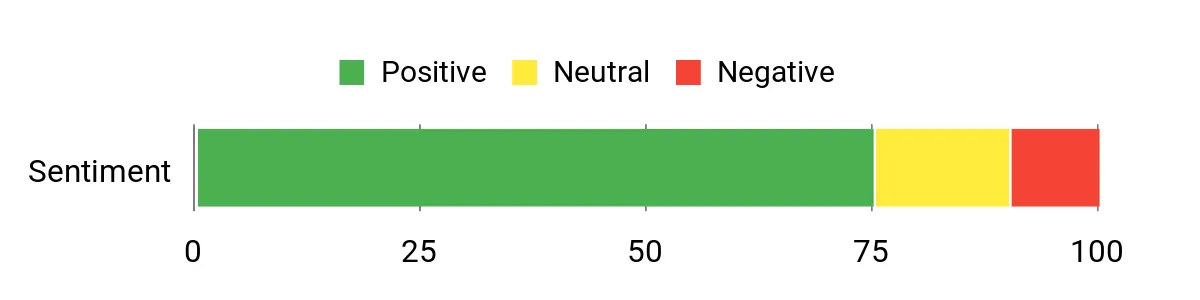
You’ll see a lot of praise for the size, color depth, and responsiveness — many owners say it transforms immersion and makes multitasking easier than multiple smaller screens. Setup is generally reported as straightforward, though some buyers note the stand and placement require planning because the panel is large and heavy.
A few users mention initial eye strain until they adjust distance or mounting, but most say the visual payoff is worth the effort.
Overall Sentiment: Positive
When It Helps
|
Situation |
How It Helps |
|---|---|
|
Cockpit Immersion |
Wraparound field of view reduces the need for multiple monitors and places track edges and mirrors closer to your periphery. |
|
Competitive Racing |
High refresh rate and low response time reduce motion blur and help you react faster to grip changes. |
|
Productivity & Streaming |
Huge horizontal space lets you run telemetry, chat, and race overlays side by side without frequent window switching. |
|
Replacing Multi‑Monitor Setups |
Eliminates bezel gap and simplifies cable and desk management while delivering a continuous image across a wide field. |
Ease of Use
|
Feature |
Ease Level |
|---|---|
|
Initial Setup |
Moderate |
|
Mounting/Stand |
Moderate |
|
Display Calibration |
Moderate |
|
Inputs & Switching |
Easy |
Versatility
Excellent for racing rigs, content creators, and productivity users who want a single expansive workspace; less suited to very small desks or setups that need close viewing distance.
Safety
Eye Saver mode, adaptive picture and flicker‑reduction features help limit eye strain during extended sessions when configured correctly.
Comfort
The 1000R curve reduces eye travel across the panel, but you should position the screen at a comfortable distance or use a strong monitor arm to avoid neck or eye fatigue.
Fun Factor
Very High — the scale and responsiveness make races feel immersive and engaging, especially for VR or cockpit setups.
Key Benefits
- Immersive 1000R curve with Dual QHD resolution for wide peripheral vision
- 240Hz refresh and 1ms response for smooth competitive gameplay
- DisplayHDR1000 and 1000 cd peak brightness for vivid highlights
- Advanced features like CoreSync, Picture‑by‑Picture and ergonomic adjustments
Rating: 4.2 (total: 346+)
rFactor 1

You’ll find rFactor rewarding if you enjoy tuning physics and racing with community content. Its detailed tire model and flexible engine let you experiment with setups, run private leagues, or drive niche vintage and dirt mods that other sims don’t support.
It’s less plug‑and‑play than modern titles, but for practice, modded events, or running custom championships it remains a capable tool that rewards patience and setup work.
What People Say
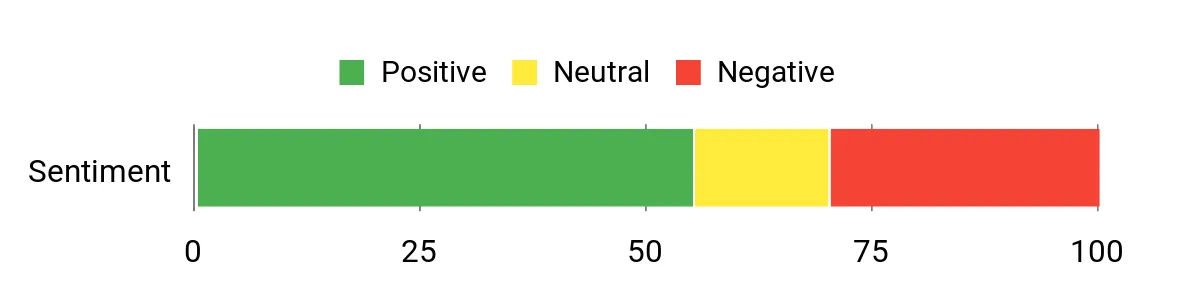
Owners often praise rFactor’s physics fidelity and the sheer variety of community mods that extend the game for years. Many users point out that the moddability and realism are its strongest assets, while common criticisms focus on dated menus, occasional compatibility headaches on modern systems, and a steeper setup curve compared with newer simulators.
Overall Sentiment: Neutral
When It Helps
|
Situation |
How It Helps |
|---|---|
|
Modded Championships |
A huge library of community cars and tracks lets you run niche series or recreate historic grids that other sims don’t offer. |
|
Driver Development |
Granular physics and tire feedback make it useful for practicing throttle control and setup changes that affect lap time. |
|
Legacy Hardware |
Runs on older PCs and can be configured to perform well on modest systems where modern sims demand more power. |
|
Private Leagues |
Server and mod support make it straightforward to host club nights with custom rules and balanced car sets. |
Ease of Use
|
Feature |
Ease Level |
|---|---|
|
Installation & Activation |
Moderate |
|
Graphics Setup |
Moderate |
|
Controller Mapping |
Moderate |
|
Mod Integration |
Moderate |
Versatility
Highly versatile through mods and tuning options, suitable for historic, rally, and circuit disciplines, but requires manual setup for many features.
Safety
Realistic tire and suspension modeling rewards correct inputs, helping you practice safer braking and cornering techniques under varied conditions.
Comfort
Gameplay can be immersive, though the older UI and configuration tools may feel clunky until you adapt them to your workflow.
Fun Factor
High for sim purists and modders who like tinkering; less immediate for players expecting an out‑of‑the‑box modern presentation.
Key Benefits
- Deep, tuneable physics and tire modeling
- Extensive mod and community content ecosystem
- Flexible vehicle and track customization
- Good toolset for private leagues and hosted events
Rating: 3.7 (total: 151+)
Lenovo Legion T7
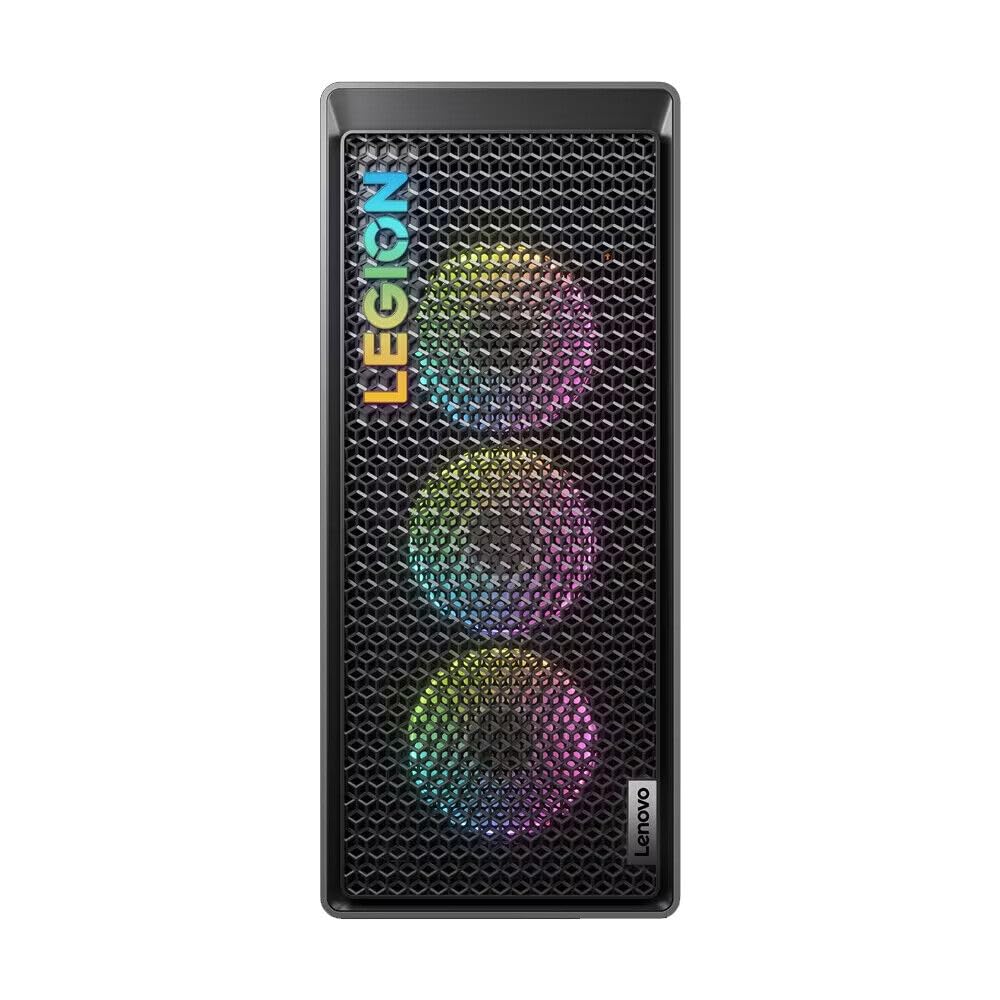
You get a turnkey powerhouse built to handle maxed‑out sims, streaming, and content work without constant tinkering. The i9 and RTX 4080 SUPER let you drive at high frame rates, run VR, or drive multiple displays while recording telemetry and streaming overlays. The roomy case and ample ports mean you can attach your wheel, pedals, and peripherals without creative cable gymnastics, and the spec headroom makes it a future‑friendly base as games and mods demand more performance.
What People Say
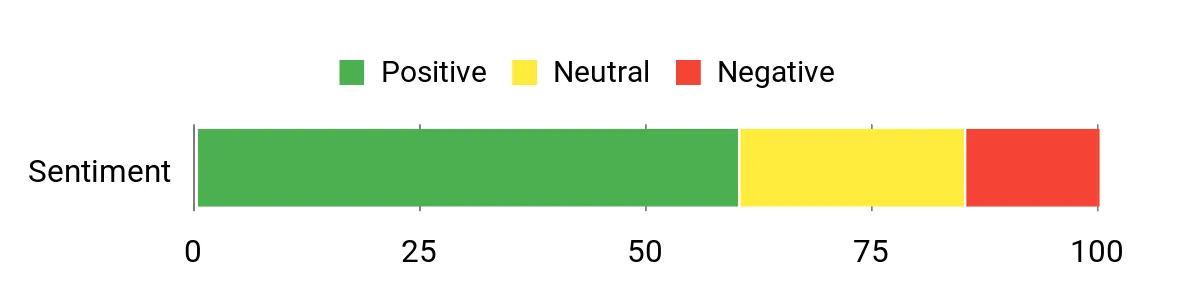
Where buyers share impressions, they often highlight the machine’s raw performance and how easily it drives high frame rates and VR. Owners appreciate the bundled connectivity for sim rigs and the convenience of a prebuilt system that avoids compatibility headaches. Notes of caution usually mention the size, weight, and the need to plan airflow or mounting for large monitors and cockpits.
Overall Sentiment: Neutral
When It Helps
|
Situation |
How It Helps |
|---|---|
|
High‑FPS Racing |
Delivers enough GPU and CPU headroom to run modern sims at high settings and refresh rates, keeping visuals smooth during fast sections. |
|
VR Sim Racing |
Powerful graphics and CPU performance reduce frame drops and latency that can disrupt immersion in VR cockpits. |
|
Streaming & Content |
Large RAM and fast storage let you record, encode, and stream gameplay while running overlays and telemetry tools. |
|
Upgrade Path |
Spacious case and multiple ports make it easier to add PCIe cards, extra drives, or high‑end capture hardware as your rig evolves. |
Ease of Use
|
Feature |
Ease Level |
|---|---|
|
Initial Setup |
Easy |
|
Driver & OS Updates |
Moderate |
|
Peripheral Wiring |
Moderate |
|
Hardware Upgrades |
Moderate |
Versatility
Well suited to sim racing, VR, streaming, and content creation; acts as a single platform for both competitive practice and media work.
Safety
Standard chassis ventilation and internal cable routing reduce hot spots; keep the case well ventilated and on a stable surface for reliable long sessions.
Comfort
Strong performance reduces system‑related frustration during races, though the tower’s footprint and airflow needs mean you should plan placement to avoid noise or cramped workspace.
Fun Factor
Very High — the system lets you push visual settings, run large displays or VR, and enjoy a noticeably more immersive sim experience.
Key Benefits
- Desktop‑class i9 CPU and RTX 4080 SUPER for sustained high performance
- 32GB RAM and 2TB SSD provide smooth multitasking and fast load times
- Plenty of USB and display outputs for sim peripherals and multi‑monitor setups
- Roomy chassis that supports future upgrades and addon cards
Rating: (total: +)
PlayStation 5 Pro

You get a console tuned for visual fidelity and responsiveness, which matters when every frame and loading pause affects immersion. The PS5 Pro pushes ray tracing and image clarity further, so tracks, shadows, and reflections look closer to real life.
Larger internal storage removes the hassle of juggling installs, and the system’s responsiveness means less time waiting and more time on track. If you race on console and value visual detail, smoother frame pacing, and quick access to large libraries, this console gives you a solid platform to build a competitive, future‑ready setup.
What People Say
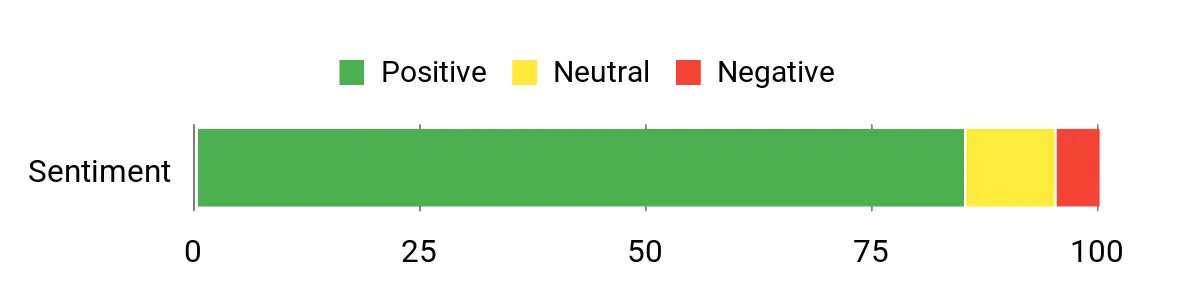
Owners frequently praise the jump in visuals and the noticeably faster load times, which together make races feel more immediate. Many mention the extra storage as a practical improvement for large libraries, and several note the system runs quietly and reliably during long sessions. A small number of users point out that benefits depend on whether a game has Pro‑level enhancements, but most report a clear upgrade in daily use.
Overall Sentiment: Positive
When It Helps
|
Situation |
How It Helps |
|---|---|
|
4K Racing |
Sharper rendering and ray tracing bring track details and cockpit clarity closer to what you see in real life, aiding situational awareness. |
|
Quick Sessions |
Faster load times mean you can jump into practice or a quick race without disruptive waiting, so short blocks of time are more productive. |
|
Large Game Libraries |
With 2TB of storage you avoid constant uninstalling and can keep multiple sims and related tools installed at once. |
|
Streaming & Capture |
Stable performance and high frame output make recorded runs and live streams look smoother and more professional. |
Ease of Use
|
Feature |
Ease Level |
|---|---|
|
Initial Setup |
Easy |
|
Game Installation |
Easy |
|
Controller Pairing |
Easy |
|
System Updates |
Moderate |
Versatility
Well suited to single‑monitor 4K setups, multi‑monitor streaming rigs, and VR passthrough workflows where supported; integrates smoothly with common sim accessories.
Safety
Improved thermal design and quiet fans help maintain consistent performance during long play sessions and reduce thermal throttling risks.
Comfort
Reduced load times and responsive menu navigation keep interruptions low, and the ergonomic DualSense ecosystem keeps control inputs comfortable for extended races.
Fun Factor
Very High — crisper visuals, faster load times, and smoother frame pacing make racing more immersive and satisfying.
Key Benefits
- Improved ray tracing and image clarity for more realistic tracks
- Higher frame rates and smoother motion for fast racing titles
- 2TB storage for large game libraries and quick access
- Fast load times and responsive system behavior that reduce downtime
Rating: 4.7 (total: 666+)
FAQ
Will This Hardware Work With My Console Or PC?
You should check compatibility before committing: look for explicit support for your platform and the connection type (USB, DisplayPort, proprietary adapter). Confirm that the wheelbase and peripherals mention your console or PC in their specs, and keep an eye on firmware and driver updates that enable cross‑platform features. If you’re mixing ecosystems, verify pass‑through or adapter support and test inputs in your OS’s controller settings before final mounting.
Which Upgrade Gives The Biggest Performance Gain?
It depends on what you want to improve: if you need sharper steering cues and immersion, a quality wheel base — especially a Direct Drive unit — changes how much detail you feel. If braking consistency and lap time repeatability are your goal, upgrading to Load Cell pedals often delivers the most measurable improvement. Consider your current weakest link and the upgrades that work together; a strong base and good pedals are complementary, and software calibration will be important after any change.
How Do I Avoid Common Setup Problems?
Make sure your rig is rigid and your wheel is securely mounted to prevent flex that masks feedback, and route power and USB cables so they aren’t strained or noisy. Run manufacturer apps and keep firmware up to date, then perform a full calibration and set sensible dead zones before tuning in‑game; use test tools in Windows or console menus to verify axes and button mapping. Finally, check cooling and mounting clearance for large bases or ultrawide monitors, and adjust pedal preload or spring tension incrementally until inputs feel predictable.
Preferred Features
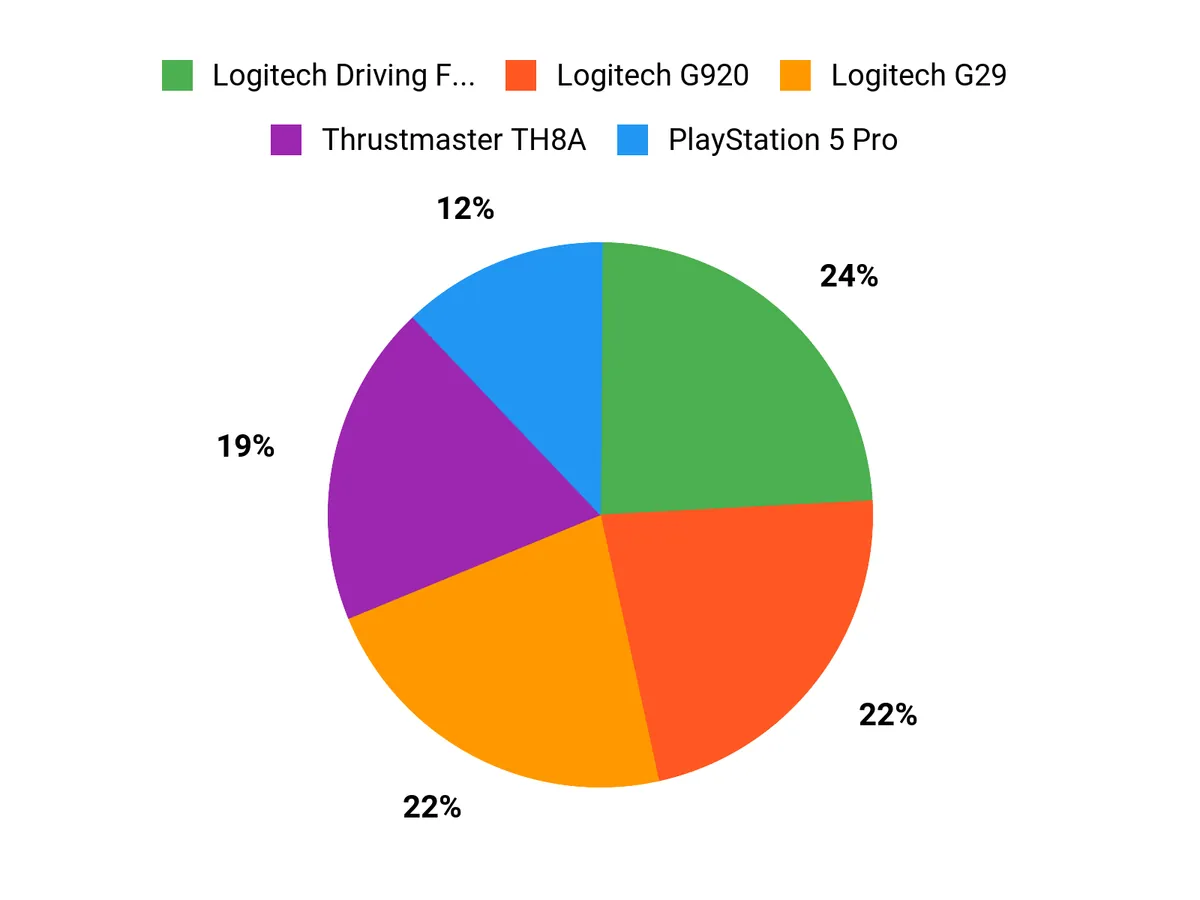
You prioritize control and realism: the Logitech PRO DD is chosen for its direct‑drive fidelity and fine force‑feedback detail, the Thrustmaster Raceline for pressure‑based braking precision from its load cell, and the TH8A for a durable, authentic H‑pattern or sequential shifting experience. You’ll also weigh compatibility, build quality, and adjustability, since a high‑torque base needs matching pedals and a solid shifter, and features like spring preload, resistance tuning, and firmware support determine how well the pieces work together for your driving style.
Wrapping Up
Start by deciding which element will give you the biggest improvement in control: a high‑fidelity wheel base or true load cell pedals. If you want the most direct connection to the track and can invest in pro hardware, choose a direct drive unit like the Logitech PRO DD and pair it with premium load cell pedals for measurable lap time gains.
If you are on console or budget constrained, the Logitech G29/G920 wheels or a strong Thrustmaster base offer very good performance for the price and an easy upgrade path. For visual immersion pick an ultrawide like the Samsung Odyssey G9 or a fast QHD panel if desk space limits you.
Finally, match shifters and handbrakes to your driving style: metal H‑pattern units are best for authentic shifting while modular combo devices give you flexibility across disciplines. Follow this order and you will get the most meaningful improvements to feel, consistency, and speed as you build out your 2026 sim racing setup.
| Product Name | Image | Rating | Compatible Devices | Specifications |
|---|---|---|---|---|
| Logitech G PRO Racing Direct Drive Wheel |
|
4.7/5 (54 reviews) | PC, PlayStation 4, PlayStation 5 |
|
| Thrustmaster Raceline Pedals III LC |
|
3.9/5 (7 reviews) | PlayStation 4, PlayStation 5, Xbox Series S, Xbox Series X, Windows |
|
| Thrustmaster TH8A Shifter |
|
4.6/5 (8,233 reviews) | PC, PlayStation 5, PlayStation 4, Xbox Series X|S |
|
| LG 27GS60QC-B Ultragear Monitor |
|
4.3/5 (1,113 reviews) | PC and compatible video game consoles |
|
| Logitech G29 Racing Wheel and Pedals |
|
4.6/5 (21,392 reviews) | PC, PlayStation 4, PlayStation 5 |
|
| Logitech G920 Racing Wheel and Pedals |
|
4.6/5 (22,282 reviews) | PC, Xbox One, Xbox Series X|S |
|
This Roundup is reader-supported. When you click through links we may earn a referral commission on qualifying purchases.